HTML is the standard markup language for web sites. HTML is used to create the skeleton structure for the front-end of websites.
CSS is a style sheet language used to described HTML. CSS dresses up the structure (HTML) with color, form, size and more.

Github is a code platform for version control and collaboration. Manage your code over terminal/git bash through git commands
HTML (Hyper Text Markup Language) is the standard markup language for websites. HTML elements are building blocks of HTML pages, and are represented by < > tags.
These are some examples of basic HTML elements.
All websites should have at least the following elements: !DOCTYPE html declaration, html, head, title, body.
In VS Code, any HTML file types can have the basics populated by typing in ! and pressing enter.
Examples of semantic elements include:
Non-semantic elements, to compare, are things like:
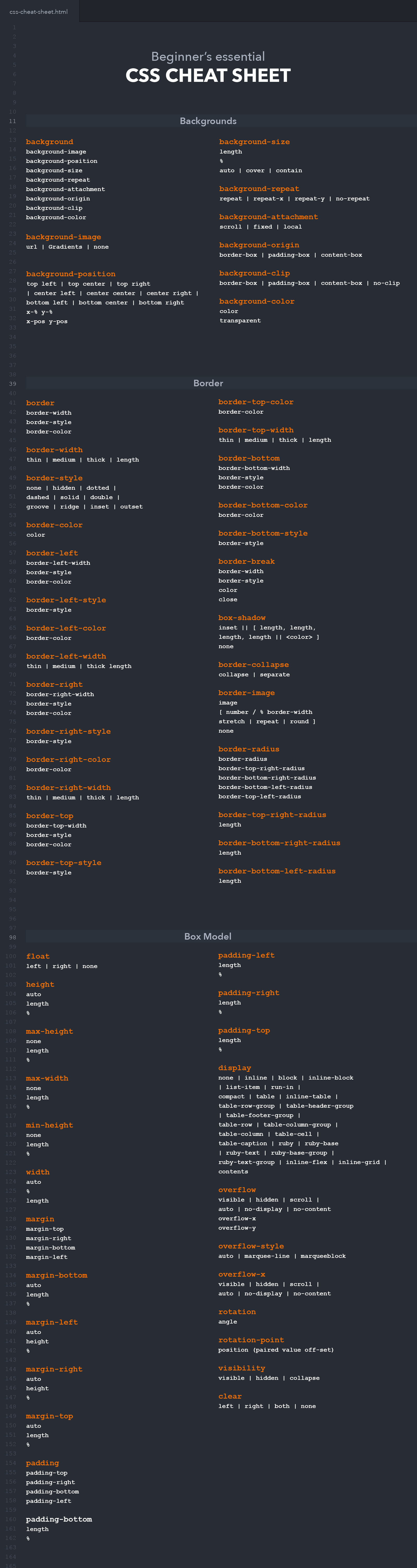
To apply CSS to HTML, the first important aspect is to include in <head>:
The next important step is to declare classes and IDs:
Hello World
Hello World
Bootstrap and Materialize are examples of style libraries that have prebuilt css for ease of use. They allow for easier implementation of layouts and site components, with a simple link to their css stylesheet/js.
Boostrap can be implemented by including:
Materialize can be implemented by including:
Bootstrap uses a 12-column grid system, that can be implemented by containing 'col' class inside 'row' class inside 'container' class.
Materialize uses a very similar 12-column grid system, that can be implemented similarly.
Pseudo-classes are used to define a special state of an element, such as when a cursor hovers over the elmeent, element has been visited vs unvisited, when an element is in focus, etc.
Syntax is:
Pseudo-elements are used to style specific parts of an element, such as the first letter or first line of an element.
Syntax is:
| set username | git config --global user.name "Your Name |
| set email | git config --global user.email "youremail@gmail.com" |
| create empty Git repo | git init <directory> |
| clone repo to local machine | git clone <repo> |
| stage changes for next commit | git add <directory/file> |
| Commit staged snapshot with message | git commit -m <message> |
| check status of files | git status |
| Fetch files from remote copy into local copy | git pull <remote> |
| Push commits to repo | strong>git push <remote> <branch> |
| 1. Clone an existing repository to your local machine | git clone <repo> |
| 2. Create a new branch | git checkout -b <branch> |
| 3. Make sure you're added as a collaborator | Repo owner will need to invite you |
| 4. Add/commit/pull as usual | git add <directory/file> git commit -m <message> git push <origin> <branch> |
| If push fails, pull | git pull <remote> <branch> |
| 5. When ready, make a pull request |
Resolve any merge conflicts and then make a new pull request via the link on Github website.
|
| If the repo owner approves, the branch gets merged into main |